
How to make a good LinkedIn profile? LinkedIn profile optimization involves improving every part of the profile to showcase the best digital version of you that’s meaningful to your ideal buyers. You need to complete LinkedIn profile keyword optimization, structuring, and information updates.
Why White Label Lead Generation Software Alone Isn’t Enough, And What You Actually Need | What is LinkedIn InMail? Here’s Your B2B InMail Outreach Guide | What Is a Fractional SDR and Is It Right for Your B2B Sales Team
Most salespeople recommend optimizing LinkedIn profile to use it as a resume, emphasising your professional experiences. But it goes beyond filling out those fields. Think of it as a resource; rather than a CV. Your LinkedIn profile should show what you do, how you do it, with proof to back it up.
An optimized profile helps you showcase your expertise, attract buyers, and build credibility. Imagine it as your sales landing page. Buyers need to understand how your services or product is best suited to help them save money, execute a project, or address other pain points. The more compelling the profile is, the higher your chances of reaching buyers and driving leads. That said, let’s look at how to make a good LinkedIn profile.
10 Ways of Optimizing LinkedIn Profile For Sales
1. Choose a Professional Photo to Optimize LinkedIn Profile
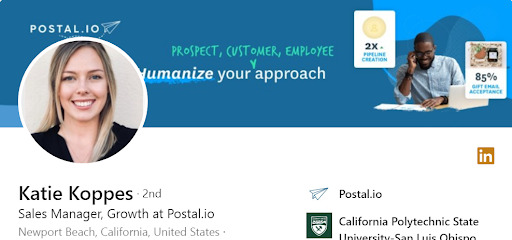
Image Source: LinkedIn
To optimize LinkedIn profile as a sales professional, the first step starts with your photo. According to LinkedIn, profiles with pictures are 14 times more likely to be viewed. Selfies won’t do. Neither will your company logo nor a blurry image of a good time at an event. Your professional shot should be a high-resolution picture that projects confidence. There are no clear-cut rules for choosing the right LinkedIn profile picture, but here are a few things professional LinkedIn profile development services do:
- Make sure you’re the only person in the photo;
- Smile; it makes you seem approachable;
- Make eye contact with the camera;
- Avoid busy backgrounds to optimize LinkedIn profile
- Wear an outfit that matches your work dress code;
- Use 400 x 400 pixels photos and a maximum file size of 8MB.
2. Customise Your Cover Photo
For LinkedIn profile optimization, couple your profile photo with a background image informing viewers about your offerings. It could be graphics or visuals that communicate your brand, tools of the trade, or the company’s achievements and awards.
In the LinkedIn profile optimization example above of a professional profile picture, the background image is customised to highlight what you can do with the product. The brand logo is also visible. A visitor can grasp the brand name and what their product can do at a glance.
Here is another LinkedIn profile optimization example of an informative cover image.

Image Source: LinkedIn
3. Optimize Linkedin Profile With An Effective Headline
By default, your headline displays your current job title and company name. But you can edit it to communicate value and optimize LinkedIn profile. Craft a headline that reflects what you do, who you help, and possibly your company name. It could be your job title followed by a simple sentence like ‘Helping XX achieve [specific goal]’ at [company name]. You have 220 character spaces to write what you need. Here’s an example of a headline that captures these elements:
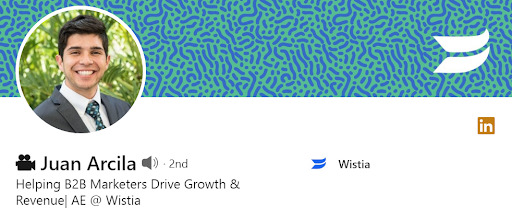
Image Source: LinkedIn
Include relevant keywords optimize LinkedIn profile additionally. The goal is to improve discoverability and help your customers find you. What words do they use when searching for your services? Add them to your headline so you can appear in relevant searches.
4. Tell Your Story In The Bio
The summary section is a crucial part of your LinkedIn profile. It builds on your headline, explaining what you do, how you do it, and why (if it applies). It answers the question: Why should buyers choose you?
Where most people fail is using this section as an extended CV, only listing their experience. This is not only overused and generic but is also rarely action-inducing. To get better results from LinkedIn, blend your skills, services, and results into a compelling story that inspires action. Here are a few tips for writing your bio:
Start With A Good Hook
It could be a relatable story, a question, a problem, or a promise. The purpose is to get readers to click to see more. Focus on a buyer-first approach. The example below hooks with an interesting question that makes you want to read more.
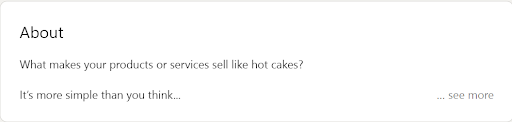
Image Source: LinkedIn
Here is another LinkedIn bio that leads with a different angle—what he (and his company) does and who they serve.
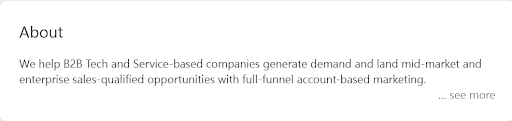
Image Source: LinkedIn
Follow With Fulfilment
After what you do comes how you do it. Highlight your expertise to optimize LinkedIn profile. Avoid words like guru and wizard as they don’t reflect actual skills (sorry, Harry). Communicate how you (or your solution) can help your audience solve the problem that impacts them the most. If you click more on the profile above, here is what you’ll find:
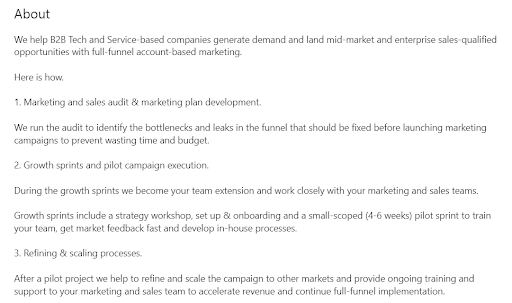
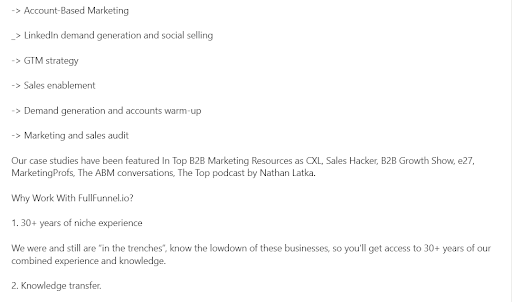
Show Results
Include statistics or figures to quantify the results you’ve driven. How did your offerings help a client save costs, gain more clients, or optimize their process? You may include case studies.
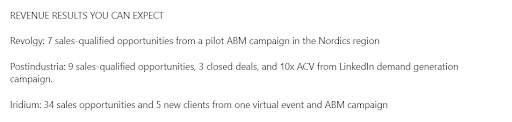
Add a CTA
What do you want readers to do after reading your summary? Send you a direct message? An email? Or schedule a call? Write it. Also, add contact information where they can reach you.
Include Keywords
Think of words your prospects are searching with and add them in the right places within your summary (e.g., LinkedIn outreach, lead generation strategist, or account-based marketing).